
§🦇 Install
Dracula CSS is published on npm as dracula-css. It is a community-built Dracula Theme for the web and is not an official Dracula team project.
§🧛 Quick Start
§CDN
Add this to your HTML <head>:
<link rel="stylesheet" href="https://cdn.jsdelivr.net/npm/dracula-css/dist/dracula.min.css" />
Or load it from unpkg:
<link rel="stylesheet" href="https://unpkg.com/dracula-css/dist/dracula.min.css" />
§npm
npm install dracula-css
Then import in your JavaScript:
import 'dracula-css/dist/dracula.css';
Or in your CSS/Sass:
@import 'dracula-css/dist/dracula.css';
§Download
Download the CSS files directly:
- dracula.css - Full bundle
- dracula.min.css - Minified
- dracula-variables.css - Variables only
§Usage Options
§Full Bundle (Recommended)
Includes CSS variables and base element styling:
<link rel="stylesheet" href="dracula.css" />
§Variables Only
Only the CSS custom properties, with no element styling:
<link rel="stylesheet" href="dracula-variables.css" />
Then use variables in your own CSS:
.my-component {
  background: var(--drac-bg);
  color: var(--drac-fg);
  border: 1px solid var(--drac-border-color);
}

.my-button {
  background: var(--drac-purple);
}

.my-button:hover {
  background: var(--drac-pink);
}
§Sass
Import the source files for maximum flexibility:
// Just variables
@use 'dracula-css/src/scss/variables';

// Variables + mixins
@use 'dracula-css/src/scss/variables';
@use 'dracula-css/src/scss/mixins';

// Everything
@use 'dracula-css/src/scss/dracula';
Access Sass variables directly:
@use 'dracula-css/src/scss/variables' as drac;

.my-heading {
  color: drac.$drac-purple;
}
§CSS-in-JS
Import the JavaScript tokens:
import { dracula, alucard } from 'dracula-css/dist/dracula-tokens.js';

// styled-components
const Button = styled.button`
  background: ${dracula.colors.purple};
  color: ${dracula.colors.fg};

  &:hover {
    background: ${dracula.colors.pink};
  }
`;

// Emotion
const buttonStyles = css`
  background: ${dracula.colors.purple};
`;

// Inline styles
const style = {
  backgroundColor: dracula.colors.bg,
  color: dracula.colors.fg,
};
§🌙 Dark/Light Mode
§Automatic (System Preference)
By default, Dracula CSS follows the system color scheme preferences:
/* Automatically applied based on prefers-color-scheme */
§Manual Toggle
Add a class to the <html> element:
<!-- Force dark mode -->
<html class="dracula-dark"></html>

<!-- Force light mode -->
<html class="dracula-light"></html>
Toggle with JavaScript:
// Toggle theme
function toggleTheme() {
  document.documentElement.classList.toggle('dracula-light');
  document.documentElement.classList.toggle('dracula-dark');
}

// Set specific theme
function setTheme(theme) {
  document.documentElement.classList.remove('dracula-light', 'dracula-dark');
  document.documentElement.classList.add(`dracula-${theme}`);
}
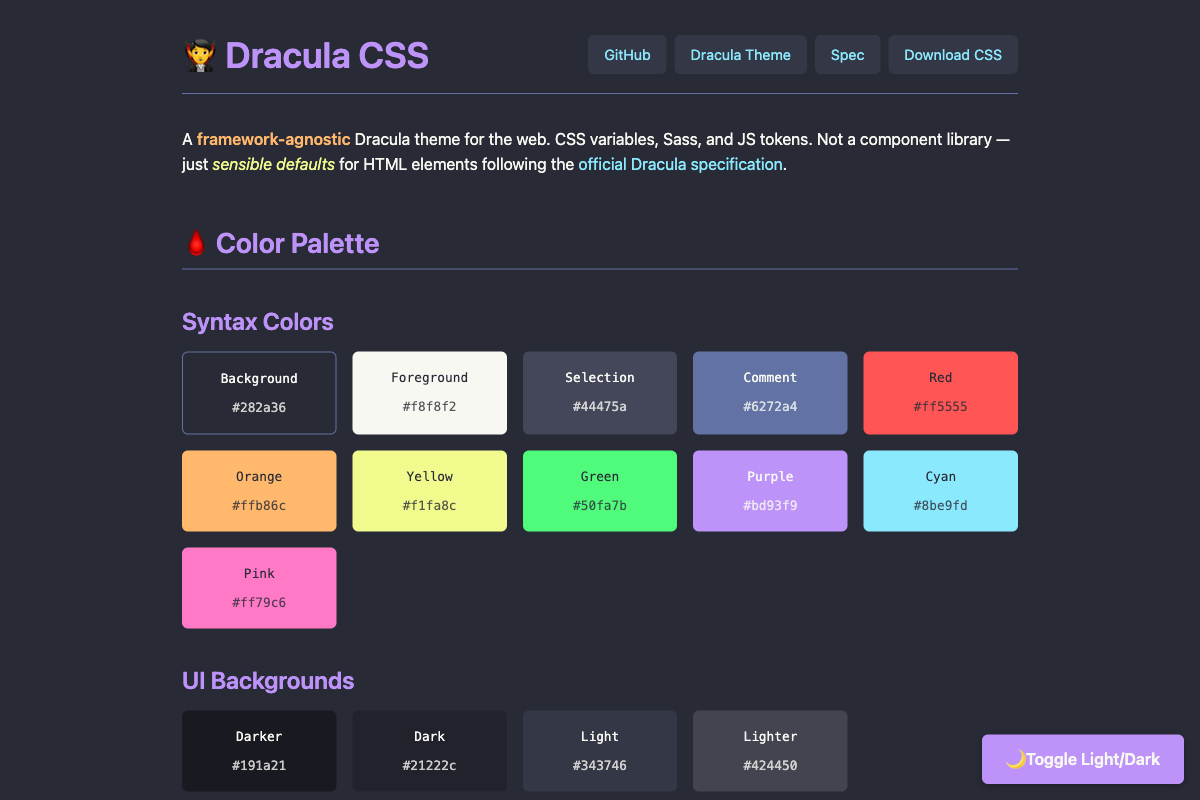
§🩸 Color Palette Reference
§Syntax Colors (Prose/Content)
| Variable | Hex | Usage |
|---|---|---|
--drac-bg | #282a36 | Background |
--drac-fg | #f8f8f2 | Foreground text |
--drac-selection | #44475a | Selection highlight |
--drac-comment | #6272a4 | Muted text, borders |
--drac-red | #ff5555 | Errors, deletions |
--drac-orange | #ffb86c | Bold text |
--drac-yellow | #f1fa8c | Italic text, highlights |
--drac-green | #50fa7b | Code, success |
--drac-purple | #bd93f9 | Headings, buttons |
--drac-cyan | #8be9fd | Links |
--drac-pink | #ff79c6 | Hover states, keywords |
§UI Backgrounds
| Variable | Hex | Usage |
|---|---|---|
--drac-ui-bg-darker | #191a21 | Deepest background |
--drac-ui-bg-dark | #21222c | Dark surface |
--drac-ui-bg-light | #343746 | Elevated surface |
--drac-ui-bg-lighter | #424450 | Highest elevation |
--drac-ui-float | #343746 | Floating elements |
§Functional Colors
| Variable | Hex | Usage |
|---|---|---|
--drac-ui-error | #de5735 | Error states, alerts |
--drac-ui-warning | #a39514 | Warning states |
--drac-ui-success | #089108 | Success states |
--drac-ui-info | #0081d6 | Info states, links |
--drac-ui-focus | #815cd6 | Focus rings |
§Spacing & Layout
| Variable | Value | Usage |
|---|---|---|
--drac-spacing-xs | 0.25rem | Tight spacing |
--drac-spacing-sm | 0.5rem | Small spacing |
--drac-spacing-md | 1rem | Default spacing |
--drac-spacing-lg | 1.5rem | Large spacing |
--drac-spacing-xl | 2rem | Extra large spacing |
--drac-border-radius | 6px | Default border radius |
§Transitions
| Variable | Value | Usage |
|---|---|---|
--drac-transition-duration | 0.15s | Animation duration |
--drac-transition-timing | ease | Animation easing |
Customize transitions globally:
:root {
  /* Slower transitions */
  --drac-transition-duration: 0.3s;

  /* Disable transitions */
  --drac-transition-duration: 0s;
}
§ANSI Colors
Terminal color palette for web-based terminal emulators and CLI-style interfaces:
| Variable | Hex | ANSI Code |
|---|---|---|
--drac-ansi-black | #21222c | 0 |
--drac-ansi-red | #ff5555 | 1 |
--drac-ansi-green | #50fa7b | 2 |
--drac-ansi-yellow | #f1fa8c | 3 |
--drac-ansi-blue | #bd93f9 | 4 |
--drac-ansi-magenta | #ff79c6 | 5 |
--drac-ansi-cyan | #8be9fd | 6 |
--drac-ansi-white | #f8f8f2 | 7 |
--drac-ansi-bright-black | #6272a4 | 8 |
--drac-ansi-bright-red | #ff6e6e | 9 |
--drac-ansi-bright-green | #69ff94 | 10 |
--drac-ansi-bright-yellow | #ffffa5 | 11 |
--drac-ansi-bright-blue | #d6acff | 12 |
--drac-ansi-bright-magenta | #ff92df | 13 |
--drac-ansi-bright-cyan | #a4ffff | 14 |
--drac-ansi-bright-white | #ffffff | 15 |
Example usage for a terminal emulator component:
.terminal {
  background: var(--drac-ansi-black);
  color: var(--drac-ansi-white);
}

.terminal .error {
  color: var(--drac-ansi-red);
}

.terminal .success {
  color: var(--drac-ansi-green);
}
§🕸️ Syntax Highlighting
Dracula CSS includes container styling for common syntax highlighters. For token colors, add the official Dracula theme for the highlighter you use.
§Prism.js
- Install Prism and the Dracula theme:
npm install prismjs
- Get the theme from github.com/dracula/prism:
<link rel="stylesheet" href="https://cdn.jsdelivr.net/npm/prism-themes/themes/prism-dracula.css" />
<script src="https://cdn.jsdelivr.net/npm/prismjs/prism.min.js"></script>
- Dracula CSS provides container styling, toolbar support, line numbers, and line highlighting:
<pre class="language-javascript line-numbers" data-line="2-3">
<code>const dracula = {
  purple: '#bd93f9',
  pink: '#ff79c6'
};</code>
</pre>
§Highlight.js
- Install Highlight.js:
npm install highlight.js
- Get the theme from github.com/dracula/highlightjs:
<link rel="stylesheet" href="path/to/dracula.css" />
<script src="https://cdn.jsdelivr.net/npm/highlight.js/lib/highlight.min.js"></script>
<script>
  hljs.highlightAll();
</script>
- Dracula CSS provides container styling and line numbers support (with highlightjs-line-numbers plugin).
§Shiki (recommended)
Shiki uses the same syntax grammars as Visual Studio Code and includes Dracula as a built-in theme. You do not need extra CSS for token colors.
- Install Shiki:
npm install shiki
- Use the Dracula theme:
import { codeToHtml } from 'shiki';

const html = await codeToHtml(code, {
  lang: 'javascript',
  theme: 'dracula', // or 'dracula-soft' for lower contrast
});
- Dracula CSS provides container styling, diff highlighting, focus lines, and line numbers:
<!-- Add line-numbers class for CSS-based line numbers -->
<pre class="shiki line-numbers">...</pre>
§Code Block Features
Dracula CSS includes optional UI patterns for code blocks:
Filename Header:
<div class="code-block">
  <div class="code-block__header">
    <span class="code-block__filename">app.js</span>
    <span class="code-block__language">JavaScript</span>
  </div>
  <pre class="language-javascript"><code>...</code></pre>
</div>
Copy Button:
<pre class="language-javascript" style="position: relative;">
  <button class="code-copy-button">Copy</button>
  <code>...</code>
</pre>
Language Badge:
<!-- Shows the language label in a corner of the block -->
<pre class="language-javascript" data-language="js">
  <code>...</code>
</pre>
§Astro / Starlight
Astro's built-in syntax highlighting uses Shiki. Configure in astro.config.mjs:
export default defineConfig({
  markdown: {
    shikiConfig: {
      theme: 'dracula',
    },
  },
});
§Docusaurus
Docusaurus uses Prism by default:
// docusaurus.config.js
module.exports = {
  themeConfig: {
    prism: {
      theme: require('prism-react-renderer/themes/dracula'),
      darkTheme: require('prism-react-renderer/themes/dracula'),
    },
  },
};
§Next.js / MDX
With rehype-pretty-code (uses Shiki):
// next.config.js or mdx config
import rehypePrettyCode from 'rehype-pretty-code';

const options = {
  theme: 'dracula',
};

// Add to rehype plugins
rehypePlugins: [[rehypePrettyCode, options]];